
Escaping the Ghost: Moving to Astro and Cloudflare Workers
From Ghost to Astro on Cloudflare Workers: static edge delivery took a read-heavy blog from 76 to 100 on Lighthouse.

A blog is a read-heavy workload. The content changes a few times a month, yet a dynamic CMS re-renders the same HTML thousands of times a day, and every one of those renders costs a database query, a template pass, and a slice of server time. For years I accepted that cost because Ghost is a genuinely good platform: focused, pleasant to write in, free of the plugin sprawl that makes WordPress heavy. The friction only becomes visible when you start measuring.
And I was measuring. Behind the editor sits a Node.js application that needs a server, a reverse proxy, database maintenance, and version updates. None of that is dramatic on its own, but all of it exists to solve a problem this site does not have: serving content that changes per request.
The 76 That Would Not Move
Ghost is fast, but it is not edge-native fast. Every visit hits the origin, queries the database, renders a template, and travels back to the visitor. You can put a CDN and caching rules in front, and I did, but the core architecture stays dynamic, and that puts a ceiling on what tuning can achieve. Despite aggressive image compression and increasingly creative Cloudflare rules, the Lighthouse performance score sat at 76 and refused to move.
Time to First Byte was too high, and Largest Contentful Paint carried the server rendering time with it. The number was telling me something specific: the optimization budget was spent, and the next lever was the architecture itself.
Rendering at Build Time, Not on Demand
Astro flips the model. Pages are rendered once, at build time, instead of on every request. There is no database and no backend process to keep alive; the whole blog is a set of Markdown files in a Git repository. A push triggers a build that applies the components, in my case a custom Astro adaptation of the classic Casper theme, and emits plain static HTML.
Astro calls the resulting approach island architecture: zero JavaScript reaches the browser unless a component explicitly asks for it. For a text-first site, that means almost never.
Delivery from the Edge
Removing the backend solves half the problem; the other half is where the files live. The site now deploys as a Cloudflare Worker serving static assets, which distributes the static HTML across the edge network, so a visitor in Tokyo is served from a data center near Tokyo rather than from a single origin in Europe. There are no servers to patch, no Node.js versions to track, no database backups to verify. Every push to main spins up a build environment, runs astro build, and publishes the new version in under 40 seconds.
The Agentic Loop
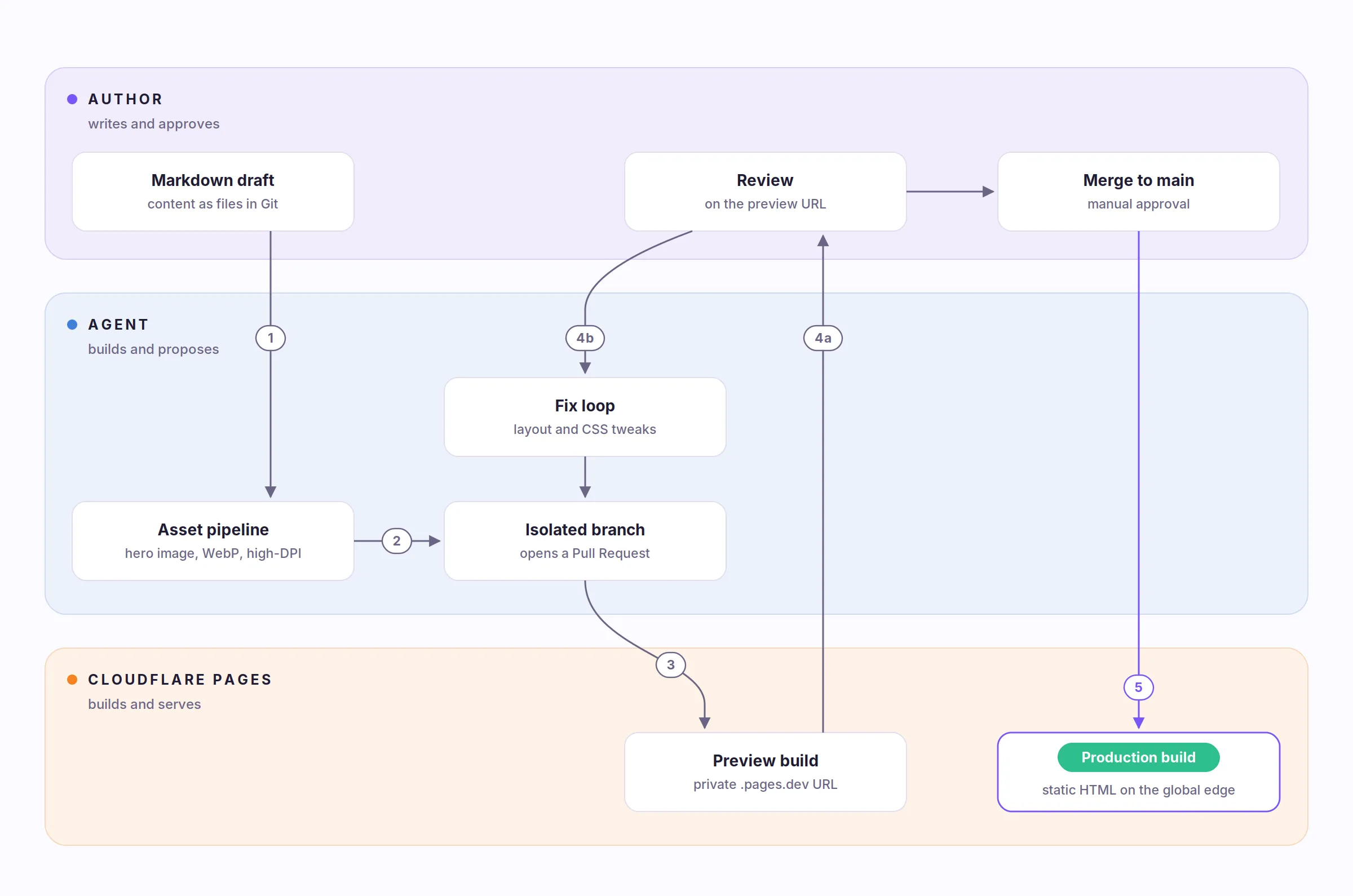
Publishing is now a pipeline with exactly one manual step. I write the article in Markdown. An agent reads the draft, generates the hero image, converts it to WebP, and scales it for high-DPI screens. It then commits everything to an isolated branch and opens a Pull Request, which Cloudflare answers with a private preview URL on workers.dev.
I review the preview. If something is off, the feedback goes back to the agent and a new preview build follows, as many times as needed. Only the final approval merges to main and triggers the production build.
From 76 to 100
The shift from dynamic rendering to static edge delivery moved the Lighthouse performance score from 76 to 100. Largest Contentful Paint dropped under one second, and Time to Interactive is effectively zero because there is almost no JavaScript left to become interactive. While rebuilding the theme I also tightened the CSS to strict WCAG AA contrast ratios in both light and dark mode, the kind of work that is cheap during a migration and expensive at any other moment.
Sometimes the best way to scale an application is to remove the application entirely.